Everything you need to make expense management easy
Barespend covers the whole trip from receipt to coded expense, on the cards and bank accounts you already have, so nobody manages expenses by hand.
Free for 7 days. No credit card required.
Receipts
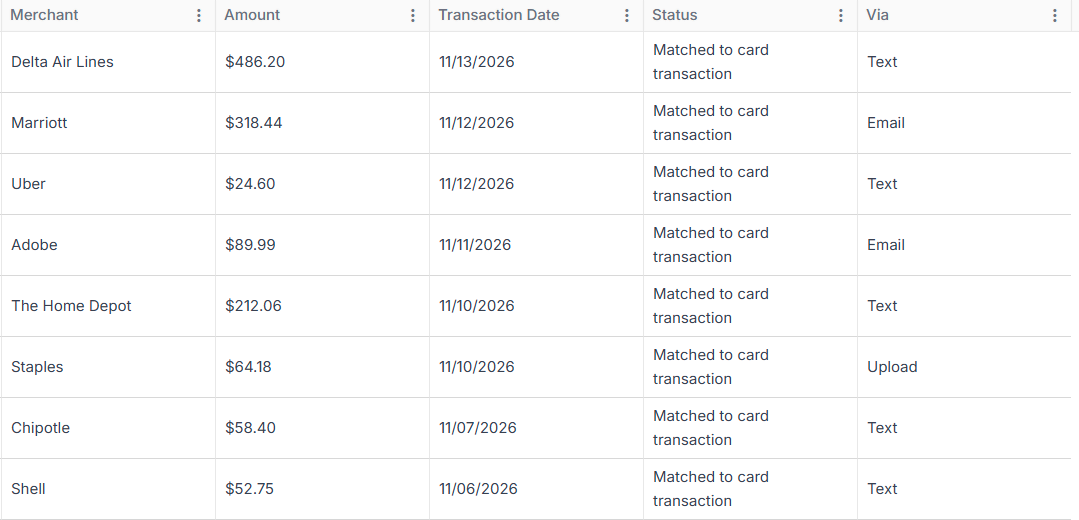
Collect receipts by text, email and upload, wherever your team is.
Text message
Employees text a photo of the receipt to Barespend and get a reply with a link to check the details.
Email forwarding
Forward a receipt, or a whole confirmation email, to your Barespend address and it becomes an expense.
Web upload
Drop in a photo or PDF from your computer.
Data extraction
Barespend reads the merchant, date, total, subtotal, tax and tip from paper receipts and PDFs.
Receipt inbox
Every receipt in one place, sorted into processed, pending and unmatched, with filters to find any one again.
Expenses
Handle card spend, out-of-pocket claims, mileage and more.
Card expenses
Each card or bank transaction becomes an expense, waiting for its receipt.
Out-of-pocket expenses
Employees claim what they paid for personally, with the receipt attached.
Mileage
Enter a trip and Barespend works out the distance from the route on Google Maps.
Per diem
Claim a daily allowance alongside other expenses.
Split expenses
Split one expense by percent or amount, each part with its own category, customer or job.
Billable expenses
Mark expenses as billable and tie them to a customer or job.
Department and location coding
Captured automatically from each employee, so nobody picks them by hand.
Copilot
An assistant can send receipts and see transactions for the people they look after.
Exports
Download any list of expenses as Excel or PDF.
Dashboard
What needs your attention, spend this month, last month and year to date, a 12-month trend, and your top categories, merchants and spenders.
Cards
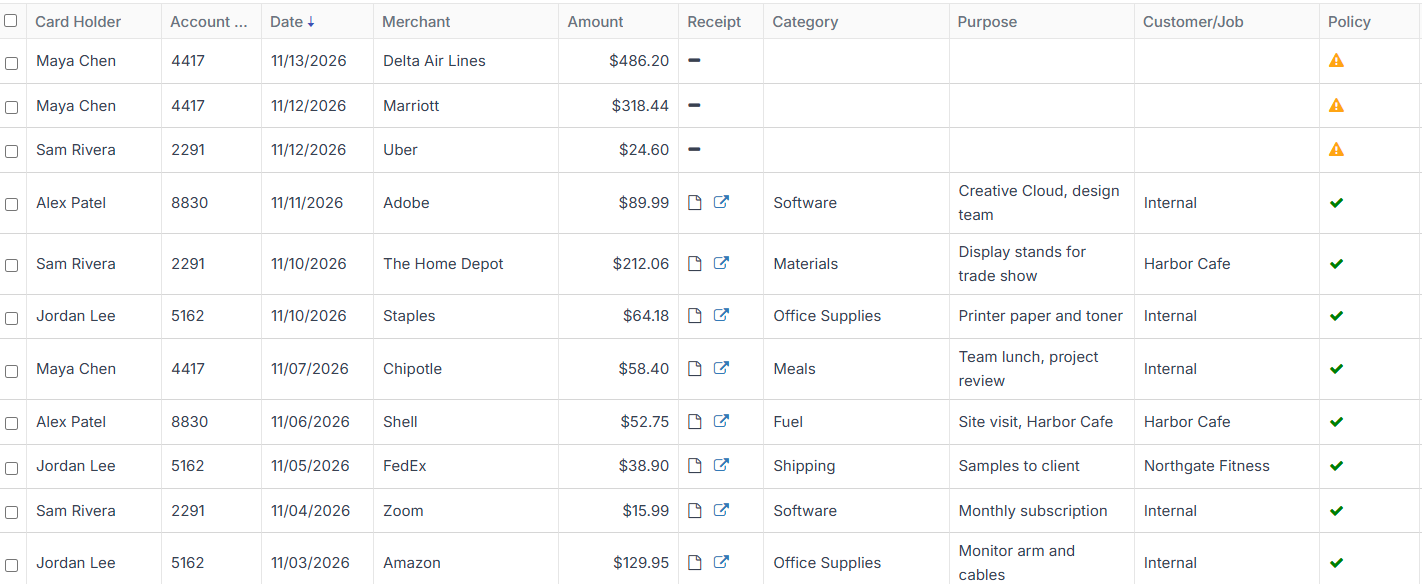
Match and reconcile card spend automatically, on the cards you already have.
Any card or bank account
Connect the business cards and bank accounts you already use. There’s no new card to issue.
Live transaction feeds
Transactions arrive as they post, pending charges included.
Statement import
If a bank can’t connect, import its statement as a CSV file.
Automatic receipt matching
Receipts and transactions are paired whichever arrives first, even when a tip changes the total.
Missing-receipt flags
Transactions without a receipt stand out the day they happen.
Card payments set aside
Payments to the card itself are recognised and kept out of your expenses.
ApprovalsPro
Send every claim to the right person and approve it from anywhere.
Manager approvals
Each claim goes to the employee’s manager.
Send back with a comment
Reject a claim with a note that says what’s missing.
Flag for repayment
Mark an expense the employee needs to pay back.
Compliance
Keep every expense complete and every receipt on file.
Completeness checks
An expense needs a receipt, a memo, a category and its coding before it goes to your books.
Roles and permissions
Owner, Admin, Manager, Bookkeeper and Employee roles, each with its own access.
Receipts on file
Every receipt is stored with its expense, ready when your accountant or the IRS asks.
Recycle Bin
Deleted items can be brought back.
BudgetsComing soon
Set budgets and track spend against them.
Budgets are coming soon: set a budget and see spend against it as it happens.
Reimbursements
Pay people back without the back-and-forth.
Claim status
Everyone can see whether a claim is submitted, approved, rejected or paid.
Mark as paid
Record when you’ve paid an employee back, so the claim closes.
Reporting
See where the money goes, sliced any way you need.
Spend overview
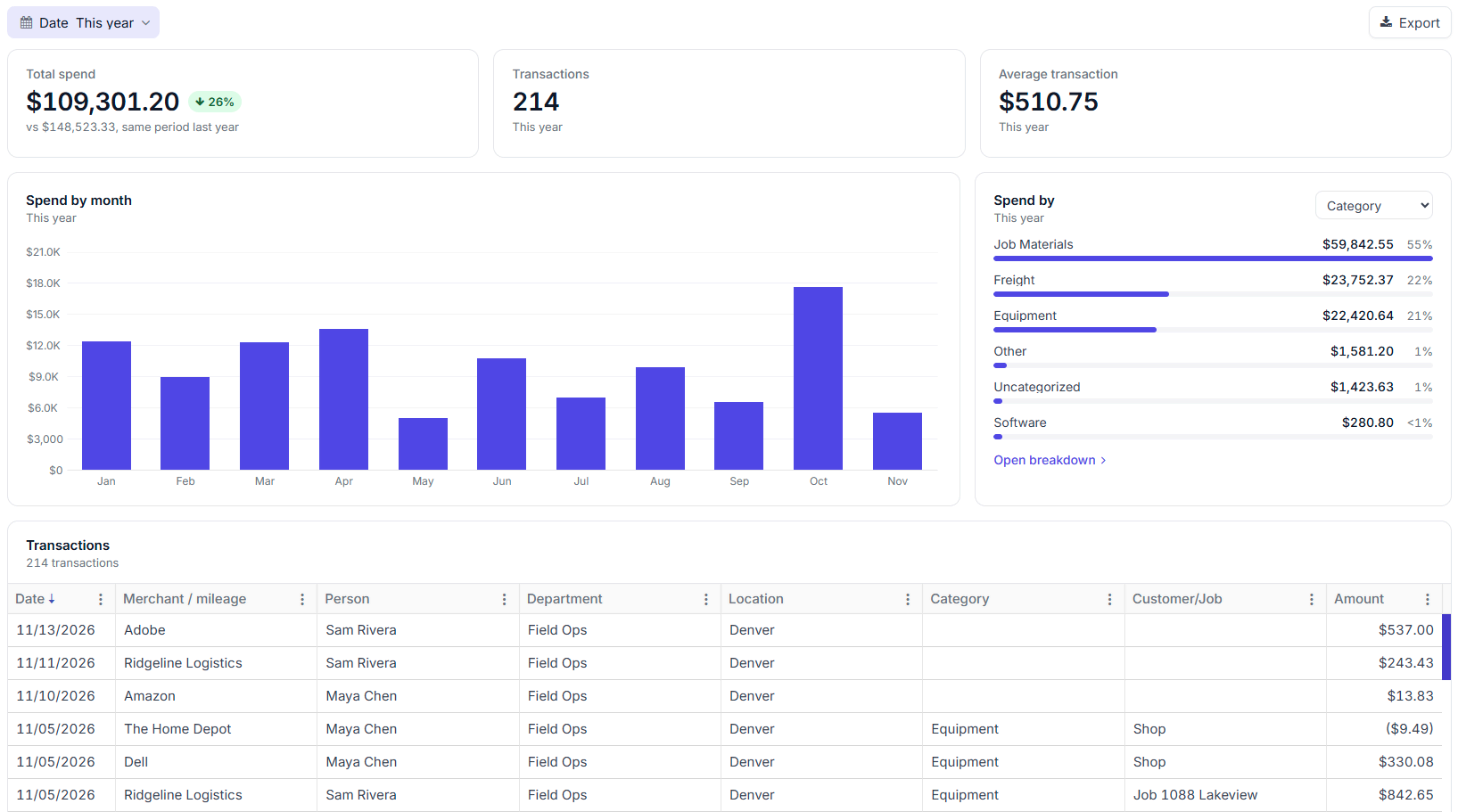
Total spend, transaction count and average transaction for any period, compared with the same period last year.
Monthly trend
Spend by month, charted.
Spend by any dimension
Break spend down by category, person, department, merchant, location or customer and job.
Breakdown view
Each group with its spend, category mix, transaction count, active dates and trend. Click a row to see the transactions behind it.
Any date range
Today, the last 7 or 30 days, this or last month, quarter or year, or dates you pick.
Excel export
Export what you’re looking at to Excel.
Integrations
Sync with your accounting system, or export a file for anything else.
See all integrationsQuickBooks Online
Two-way sync: your accounts, classes, customers and vendors come in, and coded expenses go out with the receipt attached.
Xero
Sync coded expenses to Xero.
Sage IntacctPro
Sync with Sage Intacct, including its dimensions.
NetSuite and others
Export a file for NetSuite or any other accounting system.
API accessAdvanced
Connect Barespend to your own systems.
Account setup
Set Barespend up to match your books.
Custom coding dimensionsPro
Customer or job, project and other dimensions, configured to your books.
Multiple entitiesAdvanced
Run more than one company.
Merchant rules
Decide how a vendor is always coded.
Import your team
Add employees from a CSV file.
Support
Help from the people building Barespend.
Support on every plan
Fast, responsive support, with no add-on fee for talking to a person.
Direct access to the team
Talk to the people building Barespend, so feedback turns into product.
Hands-on setupAdvanced
We set up your coding dimensions and integrations with you.
Dedicated account managerAdvanced
One person who knows your account.
Encrypted in transit
Everything between your browser and Barespend travels over TLS 1.2 or higher.
Encrypted at rest
Data sits in Azure SQL Database and receipts in Azure Blob Storage, both encrypted at rest.
Role-based access
Owners, admins, managers, bookkeepers and employees each see only what their role allows.
Penetration tested
An outside firm has tested the platform. Ask us for a copy of the report.
“Our previous expense management software was archaic and lacked the tools we needed to get receipts in and reconciled to our books in a timely manner. We couldn’t find a solution that met our requirements until Barespend. Simple, intuitive, and easy to use for the entire company. Our biggest pain points solved!”