Expense management for professional services firms
Replace the expense spreadsheet with one place for card spend and out-of-pocket claims, every cost tied to the client it belongs to.
Free for 7 days. No credit card required. Works with QuickBooks Online, Xero and Sage Intacct.
Cards and reimbursements in one place
Company card charges and out-of-pocket claims live in one list, each matched to its receipt, instead of in two spreadsheets and an inbox.
More on cards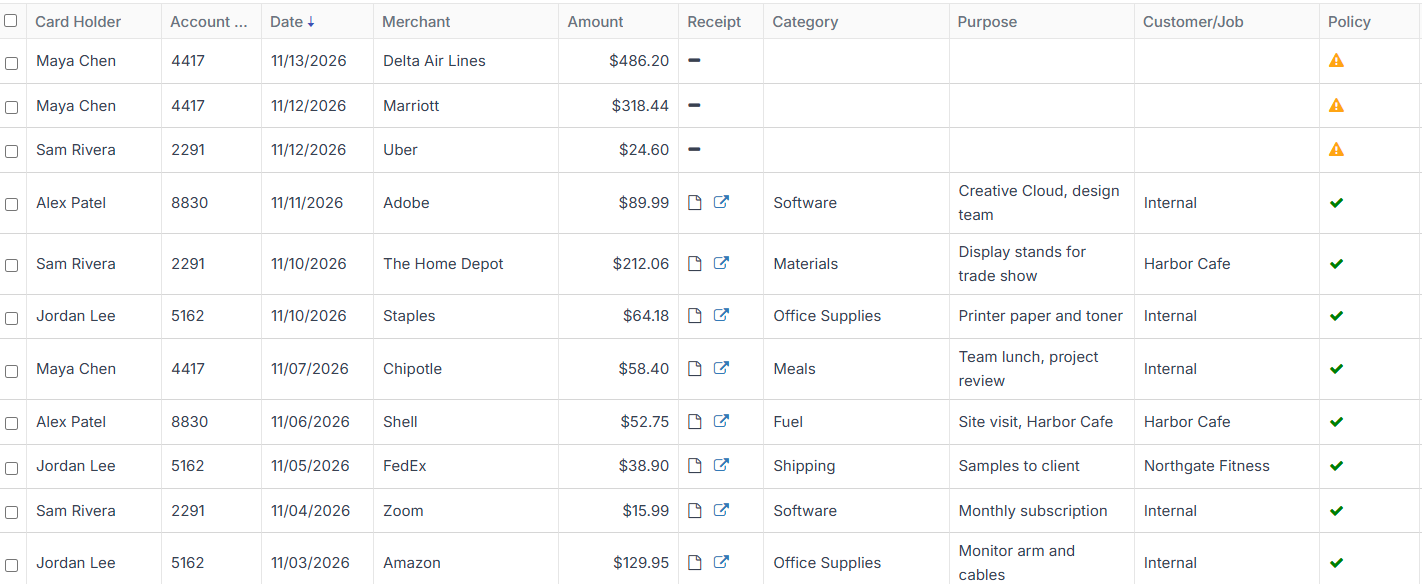
Bill client costs back
Mark expenses as billable and tie them to the customer or job, ready to bill back. Split one expense when it covers more than one client.
More on expensesReceipts from the road
Text a photo of a dinner receipt, or forward a whole flight or hotel confirmation email, and it becomes an expense.
See every way to send a receiptReimbursements without the chasing
Everyone can see whether a claim is submitted, approved, rejected or paid, and you record when you’ve paid someone back so the claim closes.
More on reimbursements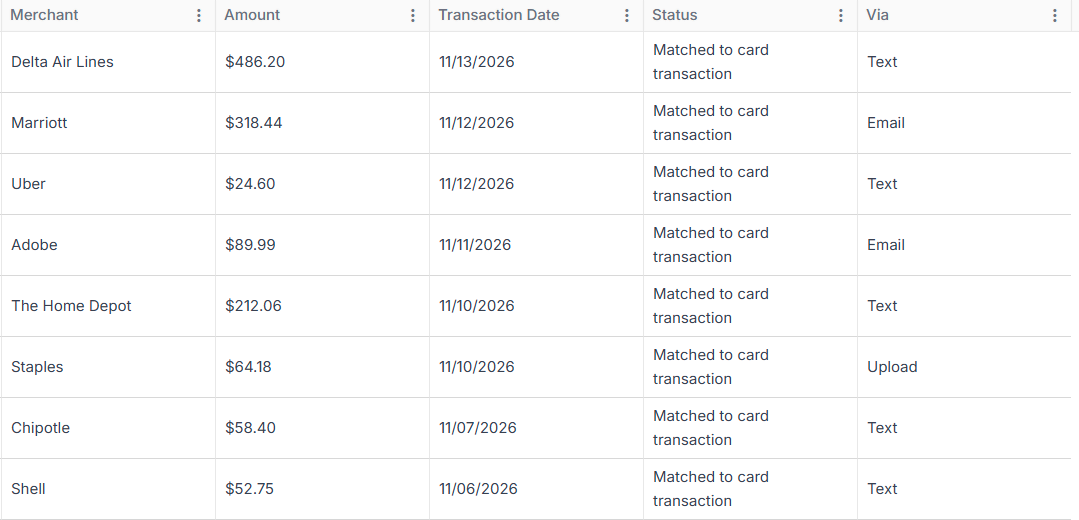
Expense management that keeps up with your client work
Sync expenses with your accounting system
Your accounts and coding come in, and approved expenses go out with the receipt attached.
“Our previous expense management software was archaic and lacked the tools we needed to get receipts in and reconciled to our books in a timely manner. We couldn’t find a solution that met our requirements until Barespend. Simple, intuitive, and easy to use for the entire company. Our biggest pain points solved!”

Everything your firm needs to manage expenses
ApprovalsPro
Each claim goes to the employee’s manager to approve or send back with a comment.
Help from an assistant
An assistant can send receipts and see transactions for the partners they support.
Mileage
Enter a client visit and Barespend works out the distance from the route on Google Maps.
Talk to the people who build it
Every plan includes fast, responsive support from the Barespend team, with no add-on fee for talking to a person. Your feedback goes to the people building the product, not into a ticket queue.
Your expense data, kept safe
- Encrypted in transit. Everything between your browser and Barespend travels over TLS 1.2 or higher.
- Encrypted at rest. Data sits in Azure SQL Database and receipts in Azure Blob Storage, both encrypted at rest.
- Role-based access. Owners, admins, managers, bookkeepers and employees each see only what their role allows.
- Penetration tested. An outside firm has tested the platform. Ask us for a copy of the report.
Professional services: common questions
Can we mark expenses as billable to a client?
Yes. Mark an expense as billable and tie it to the customer or job. With QuickBooks Online, your customers come in with the sync.
How do travel bookings get in?
Forward the confirmation email to your Barespend address and it becomes an expense, or text a photo of a paper receipt.
Which accounting systems does Barespend work with?
QuickBooks Online and Xero sync on every plan, Sage Intacct syncs on Pro, and NetSuite and other systems are supported by file export.